
Constructing Expressions#
In this section, we describe various ways to write expressions in JijModeling. JijModeling expressions are classified into several kinds (types). JijModeling provides type via Python type hints (stub files) as well as a custom, more sophisticated type checker, which can detect common modeling mistakes during construction. Below, we first summarize the overview of types in JijModeling, then learn typical patterns of expression building.
Tip
We focus on basic common patterns here. For a complete list of expressions, see the API reference for the Expression class and top-level functions in the jijmodeling module.
The Cheat Sheet also provides more complex examples, so it is worth checking after reading this section.
import jijmodeling as jm
What is an expression?#
JijModeling separates model definitions from input data to achieve various features and efficiency. As a result, modeling in JijModeling does not directly construct a concrete formula. Instead, you first build a “program that becomes a concrete mathematical model only after input data is given”, then compile it into a specific instance by providing data. JijModeling calls this “program” an expression.
More precisely, JijModeling expressions do not store concrete values, but keep an abstract syntax tree (AST) built from decision variables, placeholders, constants, and operations. Consider the following example:
@jm.Problem.define("Test Problem")
def ast_examples(problem: jm.DecoratedProblem):
N = problem.Length()
x = problem.BinaryVar()
y = problem.IntegerVar(lower_bound=0, upper_bound=42, shape=(N,))
z = x + y[0]
w = jm.sum(y[i] for i in N)
display(repr(z))
display(repr(w))
'Expression(x + y[0])'
'Expression(sum(N.map(lambda i: y[i])))'
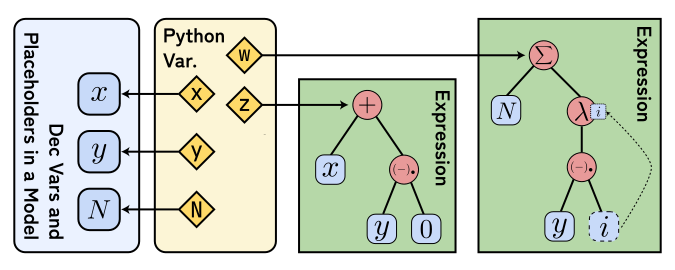
Fig. 5 Decision variables, placeholders, and syntax trees bound to Python variables#
Figure 5 visualizes the definition of Test Problem.
Decision variables and placeholders in the model such as \(x, y, N\) correspond to Python variables x, y, N.
This illustrates an ambiguity: when we say “variable”, it can mean either a parameter in the model or a Python variable that temporarily binds it.
Expressions like z = x + y[0] and w = jm.sum(y[i] for i in N) are represented as symbolic ASTs that reference these variables.
Function calls and method calls are equivalent for expressions
For an Expression object A, unary operations can be written as prefix function calls like jm.log(A) or as postfix method calls like A.log().
Both construct exactly the same expression, so use whichever you prefer. The same applies to DecisionVar and Placeholder.
However, Python builtin numbers do not support method calls, so for such cases you must use function calls like jm.log(2).
Types of expressions in JijModeling#
In JijModeling, expressions are classified by type and validated as needed. You can use JijModeling without understanding the type system in detail. Still, it is useful to know how the type checks are performed when you formulate models. This section gives a brief overview.
JijModeling actually performs type checks in two stages:
Editor assistance and static checking via Python type hints
A built-in type checker in JijModeling during model construction
(1) is bundled as Python code in the library and enables editor completion and static checks with tools like Pyright, ty, and pyrefly.
However, Python type hints cannot express all constraints (for example, validating array index sizes).
To compensate, JijModeling includes (2), its own more expressive type checker.
The checker in (2) is not invoked directly by users. It is called when you add constraints or objective terms, declare shape for decision variables/placeholders, and so on, and it validates modeling mistakes before any data is provided.
In other words, editor checks are “coarser” than the true JijModeling type system, while finer checks happen during construction.
At the Python type level, the only distinction is whether something is an Expression, but JijModeling checks much more detail internally.
There are several expression types in JijModeling; representative ones are listed below:
Kind |
Notation (example) |
Textual example |
Description |
|---|---|---|---|
Numeric types |
\(\mathbb{N}, \mathbb{Z}, \mathbb{R}\) |
|
Natural numbers, integers, real-valued scalars, and related numeric types. |
Category label types |
\(L\) |
|
Sets of labels provided later by users. |
Higher-dimensional array types |
\(\mathrm{Array}[N_1 \times \cdots \times N_k; \mathbb{R}]\) |
|
Arrays with an element type and a shape. |
Dictionary types |
\(\mathrm{TotalDict}[K; V]\) / \(\mathrm{PartialDict}[K; V]\) |
|
Dictionaries with key type \(K\) and value type \(V\). |
Tuple types |
\(T \times U\) |
|
Fixed-length tuples with per-component types. |
With these in mind, let’s look at operations that commonly appear in modeling.
When errors are raised
JijModeling’s built-in type checking is performed not right after an expression is created, but at the following times:
When a term is added to a problem’s objective
When a constraint is declared via
Problem.Constraint()When it appears in
ndim,shape, ordict_keysWhen compiling to an instance via
Problem.eval()orCompilerWhen type inference is explicitly triggered via
Problem.infer()
This is because expression types are determined only when placed in context. So even if an expression is “invalid”, it does not necessarily throw an error at construction time.
Below, we use Problem.infer() to show valid and invalid examples.
This method infers the type of a given expression based on the decision variables and placeholders defined in the Problem, and it raises a type error for invalid expressions.
Let’s look at an example. Here, we add a binary variable \(x\) and an integer \(N\), so \(x + N\) is inferred as an integer-type expression \(\mathbb{Z}\).
problem = jm.Problem("Type Inference Example")
x = problem.BinaryVar("x", description="Scalar decision variable")
N = problem.Integer("N")
problem.infer(x + N) # OK! (scalar addition)
On the other hand, a scalar value cannot be added to a string, so the following example raises an error.
try:
# ERROR! (string and scalar cannot be added)
problem.infer(x + "hoge")
except Exception as e:
print(e)
Traceback (most recent last):
while inferring the type of expression `x + Located { inner: "hoge", src_span: NoSrcSpan }',
defined at File "/tmp/ipykernel_676/594888127.py", line 3, col 19-29
while inferring the type of expression `x + Located { inner: "hoge", src_span: NoSrcSpan }',
defined at File "/tmp/ipykernel_676/594888127.py", line 3, col 19-29
while checking if types `binary!' and `Literal["hoge"]' can be combined with numeric operator `Add',
defined at File "/tmp/ipykernel_676/594888127.py", line 3, col 19-29
File "/tmp/ipykernel_676/594888127.py", line 3, col 19-29:
3 | problem.infer(x + "hoge")
^^^^^^^^^^
Type Error: Instance for binary operator Add not found for type binary! and Literal["hoge"]
What is the relationship between Expression and ExpressionLike / ExpressionFunction?
In the API reference and editor completions/docs, you may see type
names such as ExpressionLike and ExpressionFunction. These are dummy shorthand types that do not exist
in the library implementation, and are used to represent types that can be converted to Expression, or
functions from Expression to Expression.
Specifically, you can think of them as follows:
Type name |
Description |
|---|---|
|
A type that can be converted to |
|
A function that takes one or more |
Placeholders and decision variables as expressions#
As described in the previous section, decision variables and placeholders are defined with methods like Problem.BinaryVar and Problem.Placeholder.
These methods return DecisionVar and Placeholder objects that hold metadata, but when used in expression building they are automatically converted into Expression objects.
In the Test Problem example, Python variables x and y are DecisionVar objects, but in z = x + y[0], they are converted to expressions that represent a decision variable and an array of decision variables.
Constants like 0 are plain Python numbers, but they are also automatically converted when they appear in expressions.
Arithmetic operations#
Python’s builtin arithmetic operators (add/subtract/multiply/divide/mod: +, -, *, /, %, etc.) can be used with JijModeling expressions.
Besides numeric scalars, you can also apply these operations to (multidimensional) arrays or to TotalDict objects with matching key sets, subject to some conditions.
Specifically, the following combinations (left or right) are supported:
Scalar with scalar
Scalar with multidimensional array
Scalar with dictionary
Arrays with the same shape
Total dictionaries with the same key set
Broadcasting in JijModeling
(2)-(4) correspond to broadcasting in libraries like NumPy. NumPy supports more general shape combinations (for example, \((N, M, L)\) with \((M, L)\)). While such generalized broadcasting can be concise, it often makes the intent ambiguous. For this reason, JijModeling intentionally restricts broadcasting and only supports cases that should be unambiguous.
Let’s look at examples.
problem = jm.Problem("Arithmetic Operations")
x = problem.BinaryVar("x", description="Scalar decision variable")
N = problem.Length("N")
M = problem.Length("M")
y = problem.IntegerVar(
"y",
lower_bound=0,
upper_bound=10,
shape=(N, M),
description="2D array decision variable",
)
z = problem.ContinuousVar(
"z",
lower_bound=-1,
upper_bound=42,
shape=(N, M, N),
description="3D array decision variable",
)
S = problem.TotalDict(
"S", dtype=float, dict_keys=N, description="Scalar total dictionary"
)
s = problem.ContinuousVar("s", lower_bound=0, upper_bound=10, dict_keys=N)
W = problem.Float("w", shape=(N, M))
problem
Allowed examples#
problem.infer(x + 1) # OK! (scalar addition)
problem.infer(y - x) # OK! (array minus scalar)
problem.infer(S * x) # OK! (scalar times dictionary)
problem.infer(y / W) # OK! (division of arrays with the same shape (N, M))
problem.infer(S + s) # OK! (addition of total dictionaries with the same key set)
Disallowed examples#
try:
# ERROR! (dictionary times array)
problem.infer(S * y)
except Exception as e:
print(e)
Traceback (most recent last):
while inferring the type of expression `S * y',
defined at File "/tmp/ipykernel_676/2932800859.py", line 3, col 19-24
while inferring the type of expression `S * y',
defined at File "/tmp/ipykernel_676/2932800859.py", line 3, col 19-24
while checking if types `TotalDict[N; float]' and `Array[N, M; int!]' can be combined with numeric operator `Mul',
defined at File "/tmp/ipykernel_676/2932800859.py", line 3, col 19-24
File "/tmp/ipykernel_676/2932800859.py", line 3, col 19-24:
3 | problem.infer(S * y)
^^^^^
Type Error: Instance for binary operator Mul not found for type TotalDict[N; float] and Array[N, M; int!]
try:
# ERROR! (arrays with different shapes)
problem.infer(y + z)
except Exception as e:
print(e)
Traceback (most recent last):
while inferring the type of expression `y + z',
defined at File "/tmp/ipykernel_676/3762455632.py", line 3, col 19-24
while inferring the type of expression `y + z',
defined at File "/tmp/ipykernel_676/3762455632.py", line 3, col 19-24
while checking if types `Array[N, M; int!]' and `Array[N, M, N; float!]' can be combined with numeric operator `Add',
defined at File "/tmp/ipykernel_676/3762455632.py", line 3, col 19-24
File "/tmp/ipykernel_676/3762455632.py", line 3, col 19-24:
3 | problem.infer(y + z)
^^^^^
Type Error: Instance for binary operator Add not found for type Array[N, M; int!] and Array[N, M, N; float!]
Division by decision variables
At the modeling stage, decision variables can appear on either side of arithmetic operators.
However, when compiling to an instance, expressions with a decision variable in the denominator (like N / x above) currently raise an error.
Some solvers can support division by decision variables with special encodings, so the syntax is allowed, but JijModeling and OMMX do not yet support such encodings.
In the future, they may allow these encodings and compile some cases successfully.
Elementary transcendental functions
JijModeling expressions support not only arithmetic but also elementary transcendental functions such as trigonometric functions (sin(), cos(), tan()) and logarithms (log2(), log10(), ln()).
These functions can be applied regardless of whether the expression contains decision variables, but if they do, compilation to an instance currently raises an error.
Comparison operators#
Equality operators (==, !=) and order comparison operators (<, <=, >, >=) can also be used with JijModeling expressions.
If neither side contains decision variables, the result is a Boolean expression (Bool).
If at least one side can contain decision variables, the result is a special comparison type.
This is because constraints must compare expressions that include decision variables, while comprehension filters require fully determined Boolean expressions.
Currently, comparison operators can be applied to scalars and category labels, or arrays/dictionaries of those. The conditions for arrays and dictionaries are the same as the arithmetic overload rules.
problem.infer(x == y) # OK! (scalar vs array equality)
problem.infer(N <= N) # OK! (scalar order comparison)
problem.infer(y > W) # OK! (comparison of arrays with the same shape)
Indexing arrays and dictionaries#
Element access and images by indexing#
Like Python lists, dictionaries, or numpy.ndarray, JijModeling expressions support multi-dimensional indexing such as x[i, j].
Specifically, you can index expressions of the following types:
(Multidimensional) arrays
Allowed indices: natural-number expressions that do not include decision variables
Dictionaries
Allowed indices: category labels in the dictionary key set, or arbitrary integer expressions (including decision variables)
Tuples
Allowed indices: natural-number expressions (within the tuple length) that do not include decision variables
Indices can only include natural numbers, integers, or category labels that do not include decision variables.
You can write multiple indices at once, like x[i, j, k]. Using too many indices (more than the tuple length, array dimension, or dictionary tuple length) results in a type error.
Array indexing also supports slicing syntax such as x[:, 1].
In this case, x[:, 1] keeps all elements along the 0th dimension and selects index 1 on the 1st dimension.
If x is 2D, the result is a 1D array; if x has dimension \(N \ge 3\), the result is \((N-1)\)-dimensional.
If x is 1D or scalar, it is a type error.
Slices with step and end indices, like x[1, 1:N:2], are also supported.
For details on slice syntax, see the Python docs on “Slicings”.
Getting the index set of array/dictionary expressions#
For array and dictionary expressions, you can obtain their index sets.
For arrays, use indices(); for dictionaries, use keys().
For example, you can define a dictionary decision variable with the same domain as a PartialDict placeholder as follows:
problem = jm.Problem("Index and Keys Example")
N = problem.Length("N")
L = problem.CategoryLabel("L")
S = problem.PartialDict("S", dtype=float, dict_keys=(N, L))
x = problem.BinaryVar("x", dict_keys=S.keys())
problem
Set operations and comprehensions for sum/product#
“Sets” in JijModeling#
JijModeling supports the concept of a set, which represents “a sequence of values of a specific type”.
The indices() and keys() mentioned above actually return expressions that represent index sets.
Sets are used to iterate over index ranges, compute sums/products, and define indexed constraints.
Sets in JijModeling are streams
As in other modelers, JijModeling calls them “sets”, but mathematically a set has no duplicates and no ordering. By contrast, JijModeling “sets” allow duplicates and preserve order. Strictly speaking, JijModeling sets correspond to streams or iterators in general programming terms.
Some values are automatically converted to sets. For example, a multi-dimensional array becomes a set that scans elements in row-major order, a natural number \(N\) becomes the set \(\{0, 1, \ldots, N-1\}\), and a category label L becomes the set of all values of L given at compile time.
Change from JijModeling 1: arrays as “sets”
In JijModeling 1, when a multi-dimensional array appeared in belong_to= or forall=, it behaved like a set that iterates over rows.
That is, if A had shape (N, M), iterating over A produced a set of N elements, each a 1D array of length M.
In JijModeling 2, this behavior was removed, and arrays now iterate over elements in order.
If you want the old behavior, explicitly convert with rows(): use jm.rows(A) or A.rows().
Conversion to sets is usually automatic, but you can explicitly convert via set().
Sum and product over sets#
Indices become especially powerful when combined with sums/products. Below we introduce several ways to write sums and products.
Note
For simplicity we show sums using jm.sum() (or Expression.sum()), but products using jm.prod() or Expression.prod() are analogous.
With the Decorator API, sums/products can be written using intuitive comprehensions.
For example, the sum of products of decision variables and placeholders can be written as:
@jm.Problem.define("Sum Example")
def sum_example(problem: jm.DecoratedProblem):
N = problem.Length()
a = problem.Float(shape=(N,))
x = problem.BinaryVar(shape=(N,))
problem += jm.sum(a[i] * x[i] for i in N)
sum_example
Caution: Do not use Python’s built-in sum
To write sums with comprehensions, you can only use JijModeling’s jm.sum() function or Expression.sum() method.
If you accidentally use Python’s built-in sum(), or call jm.sum() outside the Decorator API, you will get an error like the following:
try:
@jm.Problem.define("Wrong Sum Example")
def wrong_sum_example(problem: jm.DecoratedProblem):
N = problem.Length()
a = problem.Float(shape=(N,))
x = problem.BinaryVar(shape=(N,))
# ERROR! Using Python's builtin sum instead of jm.sum()
problem += sum(a[i] * x[i] for i in N)
except Exception as e:
print(e)
Invalid comprehension syntax detected! Perhaps you used comprehension syntax outside decorator API, or used Python's builtin `sum` function etc., instead of `jijmodeling.sum`?
JijModeling provides jijmodeling.map(), corresponding to Python’s builtin map(), so you can write the same thing using only the Plain API as follows:
sum_example_plain = jm.Problem("Sum Example (Plain)")
N = sum_example_plain.Length("N")
a = sum_example_plain.Float("a", shape=(N,))
x = sum_example_plain.BinaryVar("x", shape=(N,))
sum_example_plain += jm.sum(jm.map(lambda i: a[i] * x[i], N))
sum_example_plain
For simple sums, you can also pass the domain and the function to jm.sum() directly:
sum_example_plain_alt = jm.Problem("Sum Example (Plain, Alt)")
N = sum_example_plain_alt.Length("N")
a = sum_example_plain_alt.Float("a", shape=(N,))
x = sum_example_plain_alt.BinaryVar("x", shape=(N,))
sum_example_plain_alt += jm.sum(N, lambda i: a[i] * x[i])
sum_example_plain_alt
When using the Plain API without the Decorator API, you need Python lambda expressions to build indexed expressions.
Tip
When jm.sum() / jm.prod() is called as a single-argument function or method, it computes the sum/product over a set.
So if you simply want the sum of elements in x, you can write jm.sum(x) or x.sum().
With the limited broadcasting described earlier, you can also write jm.sum(a * x) as above.
This also works when x is a multi-dimensional array.
Conditional sums/products#
Comprehensions in the Decorator API allow if, so you can take a sum only over even indices like this:
@jm.Problem.define("Even Sum Example")
def even_sum_example(problem: jm.DecoratedProblem):
N = problem.Length()
a = problem.Float(shape=(N,))
x = problem.BinaryVar(shape=(N,))
problem += jm.sum(a[i] * x[i] for i in N if (i % 2) == 0)
even_sum_example
JijModeling also provides jm.filter() corresponding to Python’s builtin filter, so the same model in the Plain API is:
even_sum_example_plain = jm.Problem("Even Sum Example (Plain)")
N = even_sum_example_plain.Length("N")
a = even_sum_example_plain.Float("a", shape=(N,))
x = even_sum_example_plain.BinaryVar("x", shape=(N,))
even_sum_example_plain += jm.sum(
N.filter(lambda i: (i % 2) == 0),
lambda i: a[i] * x[i],
)
even_sum_example_plain
Sums/products over multiple indices#
Comprehensions support nested for and if, so sums over multiple indices are easy to write by stacking for clauses:
@jm.Problem.define("Double Sum Example")
def double_sum_example(problem: jm.DecoratedProblem):
N = problem.Length()
M = problem.Length()
Q = problem.Float(shape=(N, M))
x = problem.BinaryVar(shape=(N, M))
problem += jm.sum(Q[i, j] for i in N for j in M)
double_sum_example
Alternatively, you can use jijmodeling.product() to form the Cartesian product \(A_1 \times \ldots \times A_n\):
@jm.Problem.define("Double Sum Example (Alt)")
def double_sum_example_alt(problem: jm.DecoratedProblem):
N = problem.Length()
M = problem.Length()
Q = problem.Float(shape=(N, M))
x = problem.BinaryVar(shape=(N, M))
problem += jm.sum(Q[i, j] for (i, j) in jm.product(N, M))
double_sum_example_alt
With if, you can build more complex examples:
@jm.Problem.define("Filtered Double Sum Example")
def filtered_double_sum_example(problem: jm.DecoratedProblem):
N = problem.Length()
M = problem.Length()
Q = problem.Float(shape=(N, M))
x = problem.BinaryVar(shape=(N, M))
problem += jm.sum(
Q[i, j]
for i in N
for j in M
if (i + j) % 2 == 0 # sum is even
)
filtered_double_sum_example
In the Plain API, this becomes:
filtered_double_sum_example_plain = jm.Problem("Filtered Double Sum Example (Plain)")
N = filtered_double_sum_example_plain.Length("N")
M = filtered_double_sum_example_plain.Length("M")
Q = filtered_double_sum_example_plain.Float("Q", shape=(N, M))
x = filtered_double_sum_example_plain.BinaryVar("x", shape=(N, M))
filtered_double_sum_example_plain += jm.sum(
jm.product(N, M).filter(lambda i, j: (i + j) % 2 == 0), lambda i, j: Q[i, j]
)
filtered_double_sum_example_plain
Or you can use jm.flat_map() (or the method form Expression.flat_map()) to map with functions that return sets:
jm.sum(
N.flat_map(
lambda i: jm.map(lambda j: (i, j), M),
).filter(lambda i, j: (i + j) % 2 == 0),
lambda i, j: Q[i, j],
)
In principle, you can write any model without the Decorator API, but it becomes complex and hard to read, so we recommend using the Decorator API.
Logical operations on conditional expressions and sets#
So far, conditions in comprehensions and filter() were simple, but in practice you often want logical expressions like “and” or “or”.
Python’s and, or, and not cannot be overloaded, so JijModeling uses bitwise operators: & (and), | (or), ~ (not), or the functions jijmodeling.band(), jijmodeling.bor(), jijmodeling.bnot().
Be careful with operator precedence in bitwise logic
Unlike and/or, & and | have lower precedence than == and !=. For example, a == b & c == d is parsed as a == (b & c) == d.
Therefore, when using & or |, always parenthesize each comparison, e.g., (a >= b) & (c == d).
Logical operations can also be used on set expressions: union is |, and intersection is &.
Complement is not supported because it may be infinite; instead, use jijmodeling.diff() to take set differences.