
Defining variables#
In this section, we learn about the two kinds of variables that appear in JijModeling: decision variables and placeholders, their roles, and how to define them. As usual, let’s start by importing the module.
import jijmodeling as jm
Two kinds of “variables” in JijModeling#
JijModeling has two kinds of variables. One is the decision variable, a core component of mathematical optimization problems, whose value is determined by the solver. In addition, JijModeling has variables called placeholders, whose values are substituted with instance data at compile time. This concept of placeholders, which separates input data from the model definition, is a key feature of JijModeling and enables type checking, constraint detection, and concise LaTeX output.
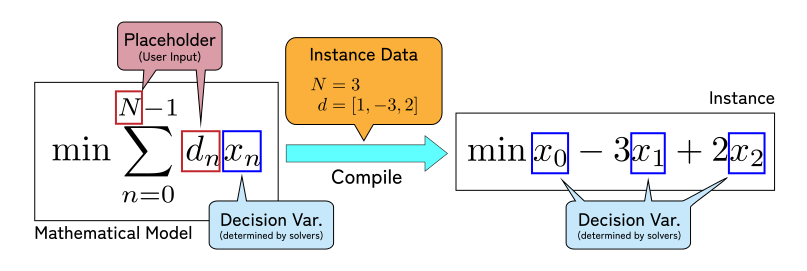
Fig. 4 Placeholders and decision variables#
Figure 4 shows a simple example of both. \(N\) and \(d\) are parameters whose values are assigned at compile time, i.e., placeholders, and are replaced by concrete values in an instance. On the other hand, each \(x_i\) is a decision variable whose value is chosen by the solver, and they remain in the instance. In this example, the \(x_n\) are indexed by the placeholder \(N\), so their length is unknown at the modeling stage. At compile time, a concrete value of \(N\) is fed, and in this example it expands to three independent decision variables.
With that in mind, let’s look at the types and declaration methods for decision variables and placeholders.
Hint
For convenience, we will explain decision variables first and placeholders second, but as long as dependencies are respected, there is no restriction on the order of definition.
Declaring single variables#
In this section we learn the types of decision variables and placeholders, and how to declare a single (non-indexed) variable.
As explained in the “Overview” and “Declaring mathematical models” sections, these variables are registered to a specific Problem object in JijModeling.
Single decision variables#
Decision variables are variables whose values are determined by solvers based on constraints and objectives. Since JijModeling is a general-purpose modeler, it supports the following representative types:
Type |
Mathematical Notation |
Description |
|---|---|---|
\(\{0, 1\}\) |
A binary variable taking the value \(0\) or \(1\). No bounds are required. |
|
\(\mathbb{Z}\) |
An integer variable. Bounds are required. |
|
\(\mathbb{R}\) |
A continuous real-valued variable. Bounds are required. |
|
- |
A variable that takes integer values within bounds or zero. Bounds are required. |
|
- |
A variable that takes continuous values within bounds or zero. Bounds are required. |
To declare a specific type of decision variable, call the corresponding method on the Problem object.
For example, let’s define a model that has a binary variable \(x\) and a continuous variable \(W' \in[-5, 10.5]\).
With the Plain API, it looks like this:
problem = jm.Problem("Model with Variables")
x = problem.BinaryVar("x", description="Some binary variable")
W = problem.ContinuousVar(
"W'",
lower_bound=-5,
upper_bound=10.5,
description="Another continuous variable",
)
problem
The first argument is required and sets the variable name.
The keyword arguments upper_bound and lower_bound set the variable bounds, and they are mandatory for all variable types except binary variables.
description is an optional human-readable description, like the one for Problem.
Bounds for single decision variables
You can write any JijModeling expression without decision variables for upper_bound and lower_bound.
See the next section, “Building expressions” (coming soon), for what expressions are allowed.
Moreover, with the Decorator API, you can omit the variable name; in that case the Python variable name is used automatically. Here is the same model defined with the Decorator API.
@jm.Problem.define("Model with Variables")
def deco_problem(deco_problem: jm.DecoratedProblem):
# Inside the Decorator API, omit the name for x
x = deco_problem.BinaryVar(description="Some binary variable")
# You can also explicitly specify the name even in the Decorator API
W = deco_problem.ContinuousVar(
"W'",
lower_bound=-5,
upper_bound=10.5,
description="Another continuous variable",
)
deco_problem
In this example, the name of \(x\) is omitted, but it is still printed as \(x\) as expected. Omitting names in the Decorator API is optional, and you can still specify a name explicitly as shown for \(W'\).
When you can omit variable names
In the Decorator API, you can omit a variable name only when the declaration has the form x = problem.*Var(...), i.e., one variable on the left and one constructor call on the right.
If you declare multiple variables at once, such as x, y = (problem.BinaryVar(), problem.BinaryVar()), it will raise an error.
Single placeholders#
Like decision variables, placeholders also have types that must be specified at declaration time. Since placeholders represent values provided by users at compile time, there are more types than decision variables. Representative placeholder types include:
Type |
Mathematical Notation |
Description |
Alias |
|---|---|---|---|
\(\{0, 1\}\) |
A binary placeholder taking value \(0\) or \(1\). |
- |
|
\(\mathbb{N}\) |
Natural numbers including zero. Used for array sizes and indices. |
||
\(\mathbb{Z}\) |
An integer value, including negatives. |
- |
|
\(\mathbb{R}\) |
A general real-valued (floating point) placeholder. |
- |
|
Tuples of the above |
\(\mathbb{Z} \times \mathbb{R}\) |
Fixed-length tuples with per-component types, often used with lists. |
- |
As with decision variables, you declare placeholders by calling methods on Problem with the same names as the types above.
Unlike decision variables, placeholders do not require bounds and have no bound-related arguments.
In general, you can think of a placeholder as the corresponding decision variable type without the *Var suffix, except that Float is named differently.
Choosing placeholder types
For simple models, it is usually enough to remember just Natural and Float.
Keep the following guidelines in mind:
Use natural numbers for array sizes and item counts, declaring them as
Naturalor aliases likeDimandLength.Use
Floator a more specific type for other numeric values.
Let’s look at an example.
problem = jm.Problem("Another Problem with Placeholder")
ub = problem.Float("ub", description="Upper bound for decision variable $x$")
x = problem.ContinuousVar("x", lower_bound=0, upper_bound=ub)
problem
As the expression shows, this model has a single decision variable \(x\) that is upper-bounded by a placeholder \(ub\) provided by the user later. As with decision variables, the Decorator API lets you omit placeholder names when they match the Python variable name.
@jm.Problem.define("Another Problem with Placeholder")
def deco_problem(problem: jm.DecoratedProblem):
ub = problem.Float(description="Upper bound for decision variable $x$")
x = problem.ContinuousVar(lower_bound=0, upper_bound=ub)
deco_problem
The Placeholder() constructor
The constructors listed above, such as problem.Float and problem.Natural, are special cases of the more general Placeholder() constructor.
For example, problem.Natural is implemented as problem.Placeholder(dtype=jm.DataType.NATURAL).
For dtype, you can use jm.DataType variants, Python built-in types like float and int, or NumPy dtypes such as numpy.uint* and numpy.int* (the bit width is ignored).
For more complex types like tuples (discussed later), use Placeholder to specify details.
Like other specialized constructors, Placeholder also supports name omission in the Decorator API.
Retrieving variable information#
The lists of decision variables and placeholders registered in a model can be obtained from the Problem object via the decision_vars property and the placeholders property.
These lists include information for indexed variables discussed below as well.
Each returns a dictionary keyed by variable name, with the corresponding metadata as values.
deco_problem.decision_vars
{'x': DecisionVariable(name="x", kind=CONTINUOUS, shape=, lower_bound=0, upper_bound=ub, )}
deco_problem.placeholders
{'ub': Placeholder(name="ub", ndim=0, dtype=Scalar(Float), jagged=false, )}
This metadata also behaves as expressions.
Therefore, if you update a Problem incrementally with multiple @problem.update or @jm.Problem.define() decorators, you can use them to refer to variables defined in earlier decorator blocks.
Tip
In the future, @problem.update is planned to accept already-defined variables as arguments. Stay tuned.
Declaring indexed variables#
So far, we have discussed how to define single decision variables and placeholders. However, in most mathematical optimization formulations, it is essential to define families of variables indexed by some set. For instance, consider the classic knapsack problem used in the quickstart sections (SCIP version, OpenJij version).
We choose up to \(N\) items with values \(v_i \in \mathbb{R}\) and weights \(w_i \in \mathbb{R}\) to maximize value without exceeding capacity \(W\). The item count \(N\) should depend on instance data, so rather than a fixed sum like \(v_0 x_0 + v_1 x_1 + v_2 x_2\), it is useful to express it as a sum whose range depends on placeholder \(N\). To represent such a collection of variables whose size can change with input data, we use indexed variables.
In JijModeling, both decision variables and placeholders can be defined as two kinds of collections:
Arrays of variables, indexed continuously from \(0\). Multi-dimensional arrays are supported.
Dictionaries of variables, indexed by an integer, string, category label, or a tuple of them.
Dedicated constructors exist, but in many cases you can declare them by passing additional keyword arguments to the constructors shown in “Declaring single variables”.
Choosing between arrays and dictionaries
Arrays and dictionaries can sometimes substitute for each other, but the following guidelines are helpful:
When to use arrays
Indices start at \(0\) and are dense and contiguous
The index order has temporal or spatial meaning (e.g., cycles)
When to use dictionaries
Indices do not necessarily start at \(0\), or are only partially defined
Indices should carry special meaning via strings or other labels
Index order is not important
“Number” of decision variables
You can define arrays and dictionaries similarly for decision variables and placeholders, but there is one crucial difference.
Because decision variables are values to be determined by a solver, the number of decision variables must be fully determined in a compiled instance. In other words, the number of decision variables must be completely determined by placeholder values.
This implies a distinction: for placeholders, arrays may be specified only by dimension and dictionaries may be partially defined, while decision-variable arrays and dictionaries must have their shapes or key sets fully specified (possibly via placeholders).
Let’s see how to declare arrays and dictionaries.
Arrays of variables#
JijModeling can handle arrays of any dimension, not only variables. Even scalar values declared in “Declaring single variables” are internally treated as zero-dimensional arrays. Array lengths along each axis can depend on placeholders, but the number of dimensions itself must be a natural-number constant literal, including zero.
Array type notation
JijModeling array types separate dimensions and element types with a semicolon ;:
Example |
Textual Notation |
LaTeX Notation |
Meaning |
|---|---|---|---|
1D integer array |
|
\(\mathrm{Array}[N; \mathbb{Z}]\) |
Integer array of length \(N\) |
2D real array |
|
\(\mathrm{Array}[N \times M; \mathbb{R}]\) |
\(N \times M\) real-valued matrix |
Arrays of decision variables#
To declare an array of decision variables, pass a shape= argument to existing constructors like BinaryVar or IntegerVar in either API.
The shape keyword argument takes an expression that evaluates to a fixed-length tuple of natural numbers. When the dimension is \(1\), you can pass a natural-number expression directly.
Let’s define the variables needed for the knapsack problem.
@jm.Problem.define("Knapsack (vars only)", sense=jm.ProblemSense.MAXIMIZE)
def partial_knapsack(problem: jm.DecoratedProblem):
W = problem.Float(description="Knapsack capacity")
N = problem.Length(description="Number of items")
# The shape can also be written as shape=(N,) using a single-element tuple.
x = problem.BinaryVar(shape=N, description="$1$ only when item $i$ is included")
partial_knapsack
Here we first define placeholders \(W\) (capacity) and \(N\) (number of items), and then define a decision-variable array \((x_i)_{i = 0}^{N-1}\) of length \(N\).
Tip
This example uses the Decorator API, but the shape argument works the same in the Plain API (except that you cannot omit the variable name).
As another example, here is a two-dimensional array declared by passing a tuple to shape:
multidim_arrays = jm.Problem("multidimensional arrays", sense=jm.ProblemSense.MINIMIZE)
N = multidim_arrays.Length("N") # Plain API, so the name is required.
M = multidim_arrays.Length("M")
x = multidim_arrays.BinaryVar(
"x",
shape=(N, M), # N x M array
)
multidim_arrays
Bounds for decision-variable arrays#
For arrays of decision variables, the upper_bound and lower_bound can be specified as:
A scalar value
An array expression with the same shape and scalar entries
A function from indices to a scalar value
In all cases, the expression must not include decision variables.
You can mix these approaches between upper and lower bounds. Here is an example using (1) and (2).
N = problem.Length("N")
lb = problem.Integer("lb")
ubs = problem.Integer("ub", shape=N)
a = problem.IntegerVar("a", shape=N, lower_bound=lb + 1, upper_bound=ub)
Here, lb is a zero-dimensional scalar, and ub is a length-\(N\) one-dimensional placeholder array.
For the decision-variable array \(a\) of length \(N\), the bounds are:
Lower bound: \(a_i \geq \mathit{lb} + 1\) for all \(i\) (case (1) above)
Upper bound: \(a_i \leq \mathit{ub}_i\) for each \(i = 0, \ldots, N - 1\) (case (2) above)
As an example of (3), consider the following artificial but illustrative case:
N = problem.Length("N")
M = problem.Length("M")
s = problem.ContinuousVar(
shape=(N,M),
lower_bound=0,
upper_bound=lambda i, j: i + j,
)
Here, for the two-dimensional array \(s\) of shape \(N \times M\), the bounds are:
Lower bound: \(s_{i,j} \geq 0\) for all indices (case (1))
Upper bound: \(s_{i,j} \leq i + j\) for each \(i = 0, \ldots, N - 1\) and \(j = 0, \ldots, M - 1\) (case (3))
By using arrays of the same shape or functions of indices, you can flexibly specify bounds even for decision-variable arrays.
Arrays of placeholders#
There are two ways to declare arrays of placeholders.
One is to use the shape keyword argument, just like decision variables.
Here we add placeholders \(v_i\) and \(w_i\) for item values and weights to the partial knapsack problem defined above in the previous section.
@partial_knapsack.update
def _(problem: jm.DecoratedProblem):
N = problem.placeholders["N"]
v = problem.Float(shape=(N,), description="Value of each item")
w = problem.Float(shape=(N,), description="Weight of each item")
partial_knapsack
The other method uses the ndim keyword argument.
By passing a natural-number constant literal to ndim, you can declare a placeholder array whose dimension is specified, but whose lengths are determined at compile time when instance data is provided.
Using shape and ndim together
You can specify ndim and shape together, but in that case the number of components in shape must exactly match ndim.
For example, the partial_knapsack above can be defined using ndim and the len_at() function as follows:
@jm.Problem.define("Knapsack (vars only, with ndim)", sense=jm.ProblemSense.MAXIMIZE)
def partial_knapsack_ndim(problem: jm.DecoratedProblem):
W = problem.Float(description="Knapsack capacity")
v = problem.Float(ndim=1, description="Value of each item")
N = v.len_at(0)
w = problem.Float(shape=N, description="Weight of each item")
x = problem.BinaryVar(shape=N, description="$1$ only when item $i$ is included")
partial_knapsack_ndim
The len_at() function returns the length of the \(i\)-th axis of the array array.
Since \(w, v, x\) all have the same length, we declare \(v\) as a 1D array and use its length to specify the shape of \(w\) and \(x\).
These two approaches define semantically equivalent models, but they differ in how instance data is provided.
In the first partial_knapsack example (see definition and its update), \(N\) is declared as a Length placeholder, so you must provide N as instance data in addition to W, v, and w when creating an instance (coming soon).
In partial_knapsack_ndim, where \(N\) is derived via len_at, the value of \(N\) is inferred from input v, so at compile time you only need to provide W, v, and w.
So when should you introduce a length placeholder, and when should you use ndim + len_at?
A good rule of thumb is: if there are dependencies between the lengths of multiple axes in a single array, then you should explicitly define a length placeholder.
As an example, consider defining a distance matrix \(d\) of shape \(N \times N\):
@jm.Problem.define("Distance matrix")
def dist_matrix(problem: jm.DecoratedProblem):
N = problem.Length()
d = problem.Float(shape=(N, N))
dist_matrix
Here both axes of the two-dimensional array \(d\) must have length \(N\), and this constraint cannot be expressed with ndim=2; you need to define \(N\) and use it in shape.
In the older JijModeling 1 series, placeholders only supported ndim declarations, so partial_knapsack_ndim-style definitions were common:
v = problem.Float(ndim=1, description="Value of each item")
w = problem.Float(ndim=1, description="Weight of each item")
However, this does not express the relationship between the shapes of \(v\) and \(w\).
Therefore, in JijModeling 2 and later, such definitions that cannot enforce length consistency are strongly discouraged, and it is strongly recommended to specify shape somewhere whenever there is a non-trivial relationship between shapes.
Graphs as arrays of tuples
JijModeling provides a Graph() placeholder constructor corresponding to directed graph structures.
For example, G = problem.Graph() declares a placeholder graph with some number of vertices.
This constructor is actually equivalent to a one-dimensional array of tuples described in “Single placeholders” and can be written as:
G = problem.Placeholder(
dtype=typing.Tuple[jm.DataType.NATURAL, jm.DataType.NATURAL],
ndim=1
)
Therefore, you can obtain the number of vertices via N = G.len_at(0) and use array operations to work with graphs.
In this way, JijModeling lets you represent complex structures by combining tuples and arrays.
Since 2.0.0: Jagged Array is strongly discouraged
In JijModeling 1, a jagged array collection was available, where shapes are not uniform. However, due to its irregularity, jagged arrays are difficult to validate with type systems, so in JijModeling 2 they are strongly discouraged and planned to be removed in a future release. You can express graphs, non-zero-based indices, or sparse structures using combinations of arrays, tuples, and dictionaries, so we strongly recommend migrating away from jagged arrays.
Dictionaries of variables and category labels#
In addition to arrays, JijModeling lets you declare dictionaries (associative arrays) of variables. While arrays are useful for dense, zero-based indexing, dictionaries are useful for sparse or partially defined indices, or for indices that are not natural numbers.
JijModeling dictionaries come in two types based on constraints on their domains: PartialDict and TotalDict.
Dict type |
数式 |
Description |
|---|---|---|
|
\(\mathrm{PartialDict}[K; V]\) |
A dictionary with keys of type |
|
\(\mathrm{TotalDict}[K; V]\) |
A dictionary that assigns a value of type |
Now let’s look at the key types that can be used for dictionaries. There are only four basic kinds:
Integers (without decision variables)
Strings
Category labels
Tuples whose components are any of (1) to (3)
Among these, (3) category labels are unique to JijModeling: they are “labels that can be used as dictionary keys, where the set of possible values is provided at compile time”.
Each category label is treated as an atom that has no structure beyond equality (== / !=), and it becomes concrete only when you supply a set of strings or integers as part of instance data at compile time.
Category labels vs placeholders
Category labels are similar to placeholders in that they are provided as part of instance data, but strictly they are a different concept. This is because each category label adds a new kind of value that can be used as a placeholder, in a sense corresponding to a user-defined class or type in languages like Python.
When to use category labels
Category labels are useful when:
The ordering of indices is not important
You do not need numeric operations on indices
You want human-readable names, such as strings
Since TotalDict requires all possible values of type K to be enumerated, it can only be used for types with a bounded domain.
Specifically, the allowed keys for each dictionary type are shown below.
Integers |
Strings |
Category labels |
Tuples |
|
|---|---|---|---|---|
|
Yes |
Yes |
Yes |
Any tuple composed of the left types |
|
All naturals less than a decision-variable-free \(n\) (\(\mathbb{N}_{<n}\)) |
A predefined list of unique strings |
Yes |
Any tuple composed of the left types |
Here, “Yes” means anything that behaves as that type can be used as a key type.
These conditions apply to dictionaries in general, not just dictionaries of variables. Below, we briefly introduce category labels and the declaration of dictionaries for decision variables and placeholders, then show concrete examples.
Declaring category labels#
Declaring category labels is similar to placeholders. You call CategoryLabel() on the model to register them.
With the Plain API, it looks like this:
problem_catlab_plain = jm.Problem("Category Label Only")
L_plain = problem_catlab_plain.CategoryLabel("L", description="Some category label")
problem_catlab_plain
As with placeholders, it takes a required name and an optional description for a human-readable explanation.
With the Decorator API, you can omit the category label name (and still specify it explicitly if you wish):
@jm.Problem.define("Category Label Only")
def problem_catlab_deco(problem: jm.DecoratedProblem):
L = problem.CategoryLabel(description="Some category label")
problem_catlab_deco
The list of category labels registered to Problem objects can be ontained by category_labels property.
In addition, you can obtain the number of elements in the category label L by jm.count() or jm.CategoryLabel.count(), which is rendered as \(\#L\) in LaTeX notation.
Dictionaries of decision variables#
As discussed in “Number of decision variables”, decision variable dictionaries must have their size fixed at compile time, so only TotalDict can be declared.
To declare a dictionary of decision variables, pass a dict_keys keyword argument to constructors like BinaryVar or IntegerVar.
This parallels passing shape when declaring arrays.
The dict_keys argument for decision variables can be:
A natural-number expression \(n\) without decision variables (interpreted as \(\mathbb{N}_{<n} = \{0, \ldots, n - 1\}\))
A Python list of strings
A category label defined by
problem.CategoryLabelA tuple composed of (1) to (3)
Caution
If you specify dict_keys together with ndim or shape in a decision-variable constructor, it raises an error because the container type cannot be determined.
Here is an example of a decision-variable dictionary keyed by a tuple of a category label and a natural-number set:
problem_for_dict = jm.Problem("Dec Var Keys demonstration")
N = problem_for_dict.Length("N")
L = problem_for_dict.CategoryLabel("L")
x = problem_for_dict.BinaryVar("x", dict_keys=(L, N))
problem_for_dict
As with decision-variable arrays, you can specify lower_bound and upper_bound for decision-variable dictionaries using:
A scalar value
A
TotalDictwith the same key set and scalar entriesA function from indices to a scalar value
Dictionaries of placeholders#
Dictionaries of placeholders are declared similarly by passing dict_keys (instead of shape) to constructors such as Float or Length.
If only dict_keys is specified, the placeholder dictionary is declared as a TotalDict by default, but if you pass partial_dict=True, it becomes a PartialDict.
When declared as a TotalDict (i.e., partial_dict is omitted or False), dict_keys can be the same as for decision variables:
A natural-number expression \(n\) without decision variables
A Python list of strings
A category label defined by
problem.CategoryLabelA tuple composed of (1) to (3)
When declared as a PartialDict, you can additionally specify:
jm.DataType.INTEGER, the Python typeint, ornumpy.int*jm.DataType.NATURALornumpy.uint*A natural-number expression \(n\) without decision variables (interpreted as \(\mathbb{N}_{<n}\))
The Python type
strA Python list of strings
A category label defined by
problem.CategoryLabelA tuple composed of (1) to (6)
You can also declare placeholder dictionaries by calling the TotalDict() or PartialDict() constructors on the Problem object.
Why there is no ndim-like option for placeholder dictionaries
There is no ndim-style argument for placeholder dictionaries. Without access to instance data, the key type cannot be determined from dimension alone.
Let’s look at concrete examples in the next section.
Example: defining a problem with dictionaries and category labels#
Here is a knapsack formulation using category labels:
@jm.Problem.define("Knapsack (vars only, CATEGORY LABEL)")
def knapsack_cat_dict(problem: jm.DecoratedProblem):
L = problem.CategoryLabel()
# Use the TotalDict constructor.
v = problem.TotalDict(dtype=float, dict_keys=L, description="Value of each item")
# Use dict_keys on a placeholder constructor.
w = problem.Float(dict_keys=L, description="Weight of each item")
x = problem.BinaryVar(
dict_keys=L, description="$x_i = 1$ only when item $i$ is included"
)
knapsack_cat_dict
This simply replaces \(N\) with \(L\) so far.
Now add a condition: for some item pairs \((i, j)\), packing them together yields an extra value (synergy bonus) \(s_{i, j}\).
In such cases, PartialDict is very useful:
@jm.Problem.define("Knapsack (vars only, with synergy)")
def knapsack_synergy(problem: jm.DecoratedProblem):
L = problem.CategoryLabel()
v = problem.TotalDict(dtype=float, dict_keys=L, description="Value of each item")
w = problem.Float(dict_keys=L, description="Weight of each item")
x = problem.BinaryVar(
dict_keys=L, description="$x_i = 1$ only when item $i$ is included"
)
# Use PartialDict to represent synergy bonuses.
s = problem.PartialDict(
"s",
dtype=float,
dict_keys=(L, L),
description="Synergy bonus for some item pairs",
)
knapsack_synergy
The description “A partial dictionary of placeholders…” is important here, because it expresses that \(s\) is defined only for some combinations of \(L\). While this could be expressed with a list of tuples and a same-length array of values, using dictionaries provides a more natural representation.