


Introduction#
What is JijModeling?#
JijModeling is a mathematical optimization modeler that lets you describe mathematical models in Python code. Using polynomials and other mathematical expressions, you can express many kinds of optimization problems.
Main features#
1. Separation of mathematical models and parameters#
JijModeling separates the symbolic definition of a mathematical model from input parameters (instance data). Instance data corresponds to coefficients and other inputs besides decision variables, and a mathematical model is compiled into solver input (an instance) only after instance data is provided.
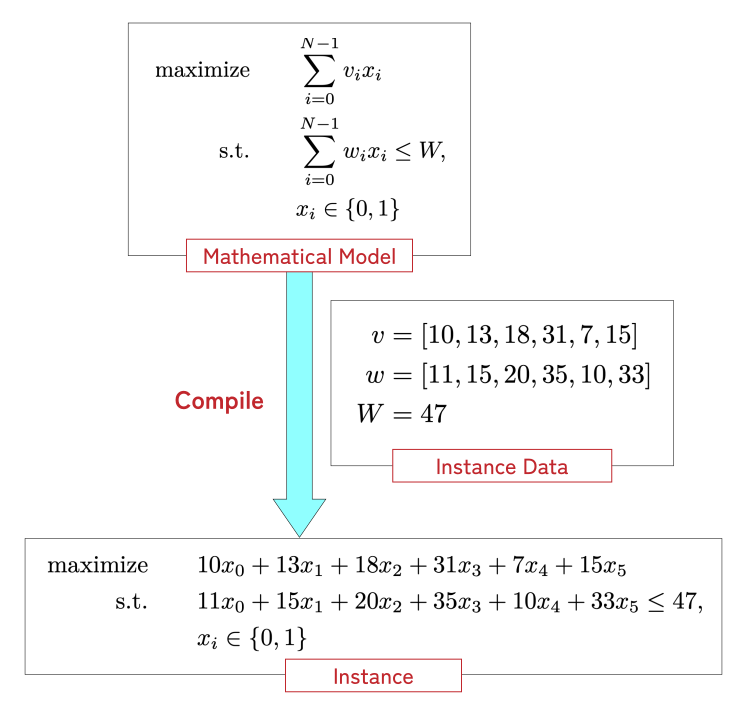
Fig. 1 Provide parameters (instance data) to a mathematical model to obtain an instance#
In this way, each model serves as a schema that produces instances from individual instance data, and you can modify the model without being affected by the size of the instance data.
2. Solver-independent modeling#
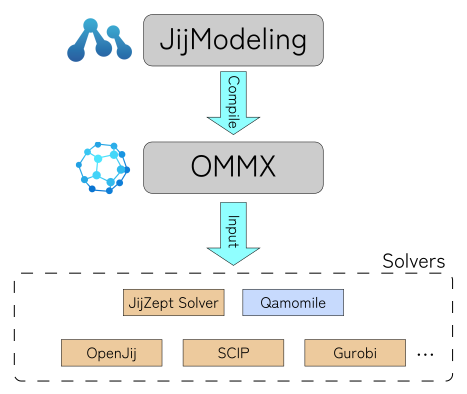
Fig. 2 Workflow of solving optimization problems with JijModeling and OMMX#
Mathematical models defined in JijModeling are ultimately compiled into instances expressed in the OMMX Message format. OMMX Message is a solver-independent data exchange format for mathematical optimization, so you can switch solvers freely among those provided by Jij (such as JijZeptSolver and OpenJij, etc.) and other solvers (such as SCIP, Gurobi, and FixstarsAmplify, etc.).
3. Early error detection with type checking#
JijModeling has its own type system to catch errors such as mismatched index dimensions while writing models. You can detect mistakes immediately, especially before inputting large instance data, which speeds up formulation.
4. Automatic detection of constraint patterns#
Some mathematical optimization solvers offer faster algorithms for specific constraint structures. Typically, users must explicitly identify and invoke these optimizations. JijModeling can automatically detect such constraints and pass the information to the solver through OMMX, speeding up solution without user intervention. In the example below, simply enabling detection yields dramatic speedups.
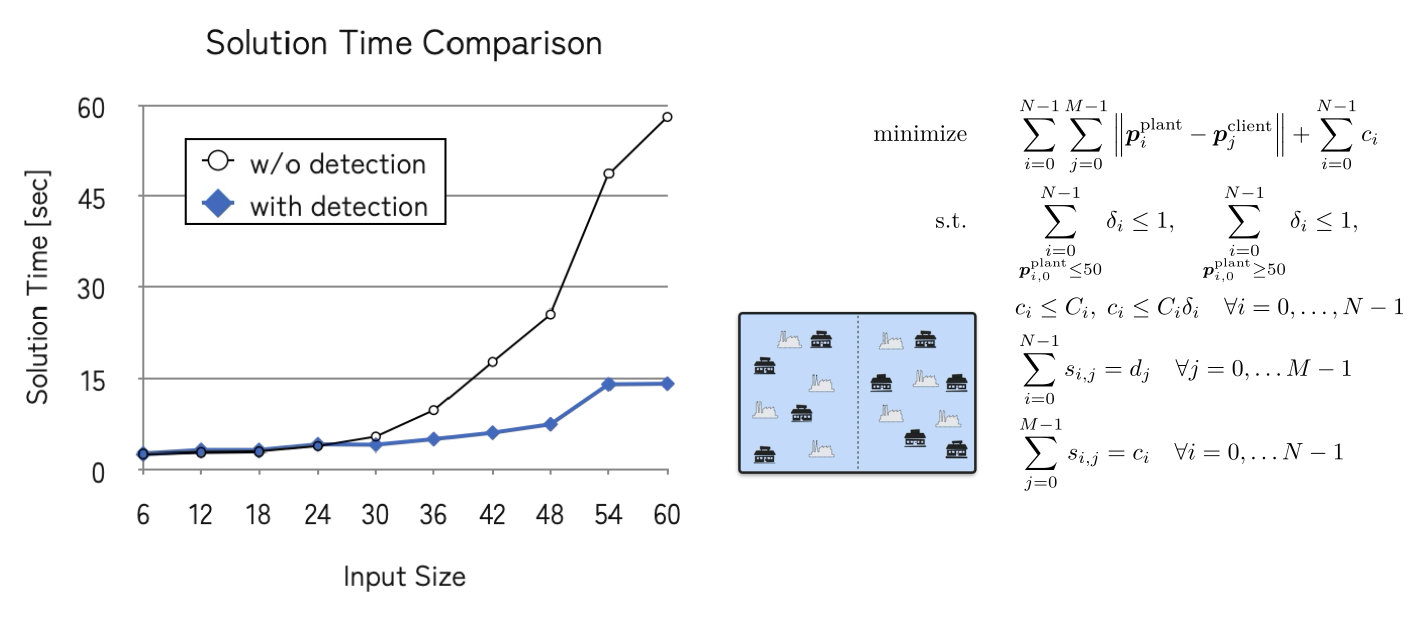
Fig. 3 Speedup from constraint detection in the two-region plant location problem#
5. \(\LaTeX\) rendering of models#
JijModeling provides powerful \(\LaTeX\) output, allowing you to inspect model definitions intuitively in the JijZept IDE, Google Colab, or standard Jupyter Notebook environments. With this, you can quickly and interactively confirm that your model is built as expected. Below is an example of a formulation of Knapsack Problem and its \(\LaTeX\) output.
import jijmodeling as jm

@jm.Problem.define("Knapsack Problem", sense=jm.ProblemSense.MAXIMIZE)
def knapsack(problem: jm.DecoratedProblem):
    N = problem.Length(description="Number of items")
    W = problem.Float(description="Capacity")
    w = problem.Float(shape=N, description="Weight of each item")
    v = problem.Float(shape=N, description="Value of each item")
    x = problem.BinaryVar(shape=N, description="Set $x_i=1$ iff item $i$ is in the knapsack")

    problem += problem.Constraint(
        "weight",
        jm.sum(w[i] * x[i] for i in N) <= W,
        description="Total weight does not exceed the capacity"
    )
    problem += jm.sum(v[i] * x[i] for i in N)

knapsack
Intuitive syntax with the Decorator API#
Starting from JijModeling 2.0.0, in addition to the traditional (“Plain”) API, it supports a shorthand syntax called the Decorator API that is available only inside @-prefixed function definitions (decorators).
This enables a more “Pythonic” modeling style, such as omitting explicit variable names and expressing symbolic summations with comprehensions.
Comparison of syntax#
Plain API:
my_problem = jm.Problem("My Problem")
N = my_problem.Length("N")
x = my_problem.BinaryVar("x", shape=N)
my_problem += jm.sum(N.filter(lambda i: i % 2 == 0).map(lambda i: x[i]))
Decorator API:
@jm.Problem.define("My Problem")
def my_problem(problem: jm.DecoratedProblem):
    N = problem.Length()
    x = problem.BinaryVar(shape=N)
    problem += jm.sum(x[i] for i in N if i % 2 == 0)
Installation#
If you use pip, install jijmodeling with the following command:
pip install 'jijmodeling>=2.0.0, <3'
If you are using uv, run:
uv add 'jijmodeling>=2.0.0, <3'
Note that jijmodeling requires Python 3.11 or later.
import jijmodeling
jijmodeling.__version__
'2.9.0'
Caution
When running the code in this document, we strongly recommend using the same version of jijmodeling as shown above.
Structure of this document#
This document provides the information you need to formulate mathematical optimization problems with JijModeling. For mathematical optimization itself, refer to materials such as JijZept’s “Mathematical Optimization Basics”. The parts of this document are organized as follows:
Quick Start: Learn how to formulate and solve optimization problems in JijModeling through the knapsack example. There are two variants depending on the solver, but the JijModeling usage is the same, so choose whichever you prefer.
Solving Optimization Problems with SCIP: Covers using the mathematical optimization solver SCIP.
Solving Optimization Problems with OpenJij: Covers using OpenJij.
Basics: Explains the basic building blocks of modeling with JijModeling.
Advanced topics: Introduces more advanced features for mathematical optimization modeling in JijModeling.
Reference: Detailed usage information for JijModeling.
jijmodeling API Reference: A comprehensive reference manual of all functions and classes in the JijModeling Python API.
Cheat Sheet: A collection of example formulations of typical constraints and optimization problems in JijModeling.
JijModeling 2 Migration Guide: A comprehensive guide to changes from JijModeling 1 to 2. Refer to it when migrating from older versions.
Release notes: Change history for each JijModeling version.