


Solving Optimization Problems with SCIP#
To understand how to use jijmodeling, let’s solve the knapsack problem on this page. However, since jijmodeling is a tool for describing mathematical models, it cannot solve optimization problems on its own. Therefore, we will solve it in combination with the mathematical optimization solver SCIP.
To use jijmodeling with SCIP, you need to install a Python package called ommx-pyscipopt-adapter (GitHub, PyPI). Please install it with the following command:
pip install ommx-pyscipopt-adapter
Problem Setting#
The knapsack problem can be formulated as a mathematical model as follows:
Hint
For more details on the formulation of the knapsack problem, please refer to here.
The meaning of each parameter in this mathematical model is as follows:
Parameter |
Description |
|---|---|
\(N\) |
Total number of items |
\(v_{i}\) |
Value of item \(i\) |
\(w_{i}\) |
Weight of item \(i\) |
\(W\) |
Weight capacity of the knapsack |
In this explanation, we will solve an instance obtained by inputting the following values into the parameters \(v_{i}, w_{i}, W\) of the above mathematical model:
Parameter |
Value |
|---|---|
\(v_{i}\) |
|
\(w_{i}\) |
|
\(W\) |
|
What is an instance?
In jijmodeling, a dictionary that stores specific values for the parameters of a mathematical model is called “instance data”, and a mathematical model with specific values assigned to its parameters is called an “instance”.
Procedure for Generating an Instance#
Using jijmodeling, you can generate an instance to input into the solver in the following 3 steps:
Formulate the knapsack problem
Prepare instance data
Generate an instance
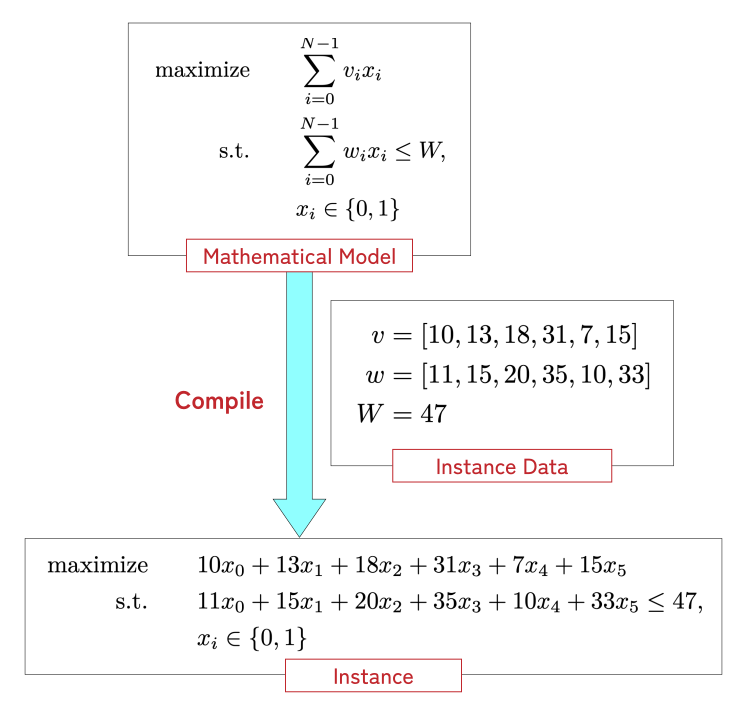
Step1. Formulate the Knapsack Problem#
Formulating the knapsack problem using jijmodeling results in the following Python code:
import jijmodeling as jm

@jm.Problem.define("Knapsack", sense=jm.ProblemSense.MAXIMIZE)
def knapsack_problem(problem: jm.DecoratedProblem):
    # Total number of items
    N = problem.Natural("N")
    # Value of items
    v = problem.Natural("v", shape=N)
    # Weight of items
    w = problem.Natural("w", shape=N)
    # Weight capacity of the knapsack
    W = problem.Natural("W")
    # Decision variable: 1 if item i is in the knapsack, 0 otherwise
    x = problem.BinaryVar("x", shape=(N,))

    # Objective function
    problem += jm.sum(v[i] * x[i] for i in N)
    # Constraint: Do not exceed the weight capacity of the knapsack
    problem += problem.Constraint("Weight Limit", jm.sum(w[i] * x[i] for i in N) <= W)

knapsack_problem
Hint
For more details on how to formulate with jijmodeling, please refer to Basics.
Step2. Prepare Instance Data#
Next, prepare the instance data for the parameters \(v_i, w_i, W\) of the mathematical model formulated in Step1.
instance_data = {
    "N": 6,
    "v": [10, 13, 18, 31, 7, 15],  # Data of item values
    "w": [11, 15, 20, 35, 10, 33], # Data of item weights
    "W": 47,                       # Data of the knapsack's weight capacity
}
Step3. Convert to an Instance#
Finally, let’s generate an instance using the formulated mathematical model and the prepared instance data.
instance = knapsack_problem.eval(instance_data)
Hint
The return value of Problem.eval is an ommx.v1.Instance object. For details, see Instance Generation and ommx.v1.Instance.
Solving the Optimization Problem#
Now, let’s solve the instance obtained in Step3 with the optimization solver SCIP. The following Python code can be used to obtain the optimal value of the objective function:
from ommx_pyscipopt_adapter import OMMXPySCIPOptAdapter

# Solve through SCIP and retrieve results as an ommx.v1.Solution
solution = OMMXPySCIPOptAdapter.solve(instance)

print(f"Optimal value of the objective function: {solution.objective}")
Optimal value of the objective function: 41.0
In addition, you can display the state of the decision variables as a pandas.DataFrame object using the decision_variables_df property of solution:
solution.decision_variables_df[["name", "subscripts", "value"]]
| name | subscripts | value | |
|---|---|---|---|
| id | |||
| 0 | x | [0] | 1.0 |
| 1 | x | [1] | 1.0 |
| 2 | x | [2] | 1.0 |
| 3 | x | [3] | 0.0 |
| 4 | x | [4] | 0.0 |
| 5 | x | [5] | 0.0 |
Hint
OMMXPySCIPOptAdapter.solve returns an ommx.v1.Solution object. For more information, see here.