


Instance Generation#
Up to the previous chapter, we have learned how to formulate mathematical models. In this chapter, we explain the workflow of compiling a model into an OMMX instance and solving it via an OMMX Adapter.
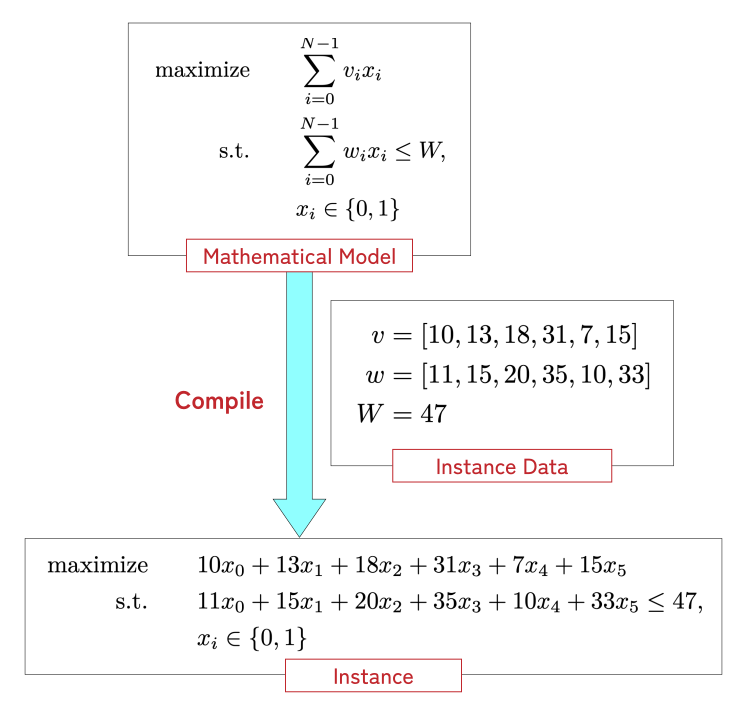
Fig. 6 Workflow up to creating instance data#
Fig.6 reprints the workflow from model to instance. Following this, we explain how to prepare instance data and then compile it.
Below, we use the following knapsack problem with synergy bonuses as an example.
import jijmodeling as jm


@jm.Problem.define("Knapsack with Synergy", sense=jm.ProblemSense.MAXIMIZE)
def problem(problem: jm.DecoratedProblem):
    N = problem.Natural()
    W = problem.Float(description="Weight limit of the problem")
    v = problem.Float(shape=(N,), description="Values of the items")
    w = problem.Float(shape=(N,), description="Weights of the items")
    s = problem.PartialDict(
        dtype=float, dict_keys=(N, N), description="Synergy bonus between items"
    )
    x = problem.BinaryVar(shape=(N,), description="Item selection variables")

    problem += jm.sum(v[i] * x[i] for i in N)
    problem += jm.sum(s[i, j] * x[i] * x[j] for i, j in s.keys())

    problem += problem.Constraint("weight", jm.sum(w[i] * x[i] for i in N) <= W)


problem
Preparing instance data#
You need to prepare data corresponding to each placeholder and category label. Currently, the data specifications are as follows:
Placeholder type |
Corresponding Python data type |
|---|---|
Single placeholder |
A Python number or tuple matching the placeholder’s value type |
Placeholder array |
A Python (nested) list or |
Placeholder dictionary |
A Python |
Category label |
A Python list of unique numbers or strings |
You also need to satisfy constraints on array shapes and the totality of dictionaries. At the moment, note that dictionary data cannot be provided as arrays.
Prepare instance data as a Python dictionary that maps each variable name to its data.
Let’s create instance data for problem.
import random
import numpy as np

random.seed(42)
N_data = 10
W_data = random.randint(10, 75)
v_data = [random.uniform(1, 20) for _ in range(N_data)]
w_data = np.array(
    [random.uniform(1, 15) for _ in range(N_data)]
)  # NumPy arrays are also allowed
s_data = {(1, 2): 5.0, (1, 4): 3.0, (2, 9): 5.0, (3, 5): 10}

instance_data = {"N": N_data, "W": W_data, "v": v_data, "w": w_data, "s": s_data}
Random instance data generation
You can use the Problem.generate_random_dataset and
Problem.generate_random_instance methods to generate random instance data.
For more details, please refer to the API documentation and upcoming advanced topic tutorials.
Compiling to an instance#
Once the model and instance data are prepared, you can compile them into an OMMX instance.
The simplest way is to use the Problem.eval() method:
instance1 = problem.eval(instance_data)
instance1.constraints_df
| equality | type | used_ids | name | subscripts | description | |
|---|---|---|---|---|---|---|
| id | ||||||
| 0 | <=0 | Linear | {0, 1, 2, 3, 4, 5, 6, 7, 8, 9} | weight | [] | <NA> |
instance1.decision_variables_df
| kind | lower | upper | name | subscripts | description | substituted_value | parameters.subscripts | |
|---|---|---|---|---|---|---|---|---|
| id | ||||||||
| 0 | Binary | 0.0 | 1.0 | x | [0] | Item selection variables | <NA> | [0] |
| 1 | Binary | 0.0 | 1.0 | x | [1] | Item selection variables | <NA> | [1] |
| 2 | Binary | 0.0 | 1.0 | x | [2] | Item selection variables | <NA> | [2] |
| 3 | Binary | 0.0 | 1.0 | x | [3] | Item selection variables | <NA> | [3] |
| 4 | Binary | 0.0 | 1.0 | x | [4] | Item selection variables | <NA> | [4] |
| 5 | Binary | 0.0 | 1.0 | x | [5] | Item selection variables | <NA> | [5] |
| 6 | Binary | 0.0 | 1.0 | x | [6] | Item selection variables | <NA> | [6] |
| 7 | Binary | 0.0 | 1.0 | x | [7] | Item selection variables | <NA> | [7] |
| 8 | Binary | 0.0 | 1.0 | x | [8] | Item selection variables | <NA> | [8] |
| 9 | Binary | 0.0 | 1.0 | x | [9] | Item selection variables | <NA> | [9] |
instance1.objective
Function(5*x1*x2 + 3*x1*x4 + 5*x2*x9 + 10*x3*x5 + 1.4752043492306717*x0 + 6.225557049013266*x1 + 5.241004024827633*x2 + 14.992953069116236*x3 + 13.857290261035315*x4 + 17.951411786392065*x5 + 2.651837819958907*x6 + 9.016514574020139*x7 + 1.5661471693233366*x8 + 5.154121521268464*x9)
This actually calls Compiler.from_problem() and
Compiler.eval_problem() internally, and is equivalent to:
compiler = jm.Compiler.from_problem(problem, instance_data)
instance2 = compiler.eval_problem(problem)

assert instance1.objective.almost_equal(instance2.objective)
assert len(instance1.constraints) == 1
assert len(instance2.constraints) == 1
assert instance2.constraints[0].equality == instance1.constraints[0].equality
assert instance2.constraints[0].function == instance1.constraints[0].function
Why do we pass the problem twice?
In the example above, we pass the problem problem to both
from_problem() and eval_problem().
This may look redundant, but they serve different purposes:
- The
Problemargument tofrom_problem() Used to extract information such as decision variable types that the
Compilerneeds at evaluation time. In JijModeling, this bundle of information is called aNamespace. Internally, this is obtained via thenamespace()property and passed to theCompiler constructor.- The
Problemargument toeval_problem() Specifies the
Problemyou want to compile into an instance. ACompileris not tied to a single problem, and can be reused for multipleProblemobjects that share placeholders and decision variables.
If you only need to compile a Problem into an instance,
Problem.eval() is convenient. On the other hand, a
Compiler object can also provide OMMX-side IDs of constraints and decision
variables via get_constraint_id_by_name() and
get_decision_variable_by_name().
In addition to compiling instances, Compiler can evaluate individual scalar
functions into OMMX Function objects via
eval_function(), or compile individual constraints (without registering
them on a Problem) into OMMX Constraint objects via
eval_constraint().
Below is an example that evaluates a function expression using decision variables from problem:
x_ = problem.decision_vars["x"]
compiler.eval_function(jm.sum(x_.roll(1) * x_) - 1)
Function(x0*x1 + x0*x9 + x1*x2 + x2*x3 + x3*x4 + x4*x5 + x5*x6 + x6*x7 + x7*x8 + x8*x9 - 1)
These eval_function and eval_constraint methods are useful for debugging, and can also be used to
transform a compiled ommx.v1.Instance.
Once created, a Compiler can be reused across multiple models that share placeholders and decision
variables, and the ID mappings for decision variables and constraints are preserved. This is useful for
cases like compiling multiple models with the same parameters but different objectives or constraints
and comparing their results.
On the other hand, since each call to jijmodeling.Problem.eval() creates a new Compiler, IDs for the same decision variables and constraints may differ between generated instances.
When IDs must remain consistent, create one Compiler explicitly and reuse jijmodeling.Compiler.eval_problem().
Transforming problems with the OMMX SDK
The OMMX SDK provides various features for transforming a compiled
Instance object. For example, you can fix decision variable values or use
ommx.v1.Instance.to_qubo() to convert a constrained problem into an unconstrained QUBO
via a penalty method. For details, see the official OMMX documentation.
Options for eval and eval_problem#
Both Problem.eval() and
Compiler.eval_problem() accept the same keyword-only
arguments to control behavior:
prune_unused_vars: boolWhen set to
True, only decision variables that appear in the objective or constraints are registered in theInstance. The default isFalse, and decision variables that do not appear in the model are still registered.constraint_detection: Optional[ConstraintDetectionConfig | bool] = NoneJijModeling detects the structure of constraints and reflects it in the OMMX instance so that OMMX Adapters can call solvers more efficiently. This detection is enabled by default, but it currently incurs a compilation overhead of up to a few seconds. Passing a
ConstraintDetectionConfigobject allows you to specify which constraint types to detect and to adjust behavior parameters. You can also passFalseto disable detection entirely.
Solving an instance#
Once you have an OMMX instance, you can solve it using an OMMX Adapter. Below is an example using the SCIP adapter:
from ommx_pyscipopt_adapter import OMMXPySCIPOptAdapter

# Solve the problem via SCIP and get a solution as ommx.v1.Solution
solution = OMMXPySCIPOptAdapter.solve(instance1)

print(f"Optimal objective value: {solution.objective}")

solution.decision_variables_df[["name", "subscripts", "value"]]
Optimal objective value: 60.97707309867254
| name | subscripts | value | |
|---|---|---|---|
| id | |||
| 0 | x | [0] | 0.000000e+00 |
| 1 | x | [1] | 1.000000e+00 |
| 2 | x | [2] | 1.000000e+00 |
| 3 | x | [3] | 1.000000e+00 |
| 4 | x | [4] | 4.440892e-16 |
| 5 | x | [5] | 1.000000e+00 |
| 6 | x | [6] | 0.000000e+00 |
| 7 | x | [7] | 0.000000e+00 |
| 8 | x | [8] | 1.000000e+00 |
| 9 | x | [9] | 0.000000e+00 |
For details on how to use OMMX Adapters, see the OMMX User Guide. In addition to SCIP, OMMX Adapters for various solvers are available and can be used in the same manner.
OMMX SDK name-based extraction does not support dict-based variables or constraints
The Solution object provides name-based extraction methods such as
extract_decision_variables() and
extract_constraints().
At the moment, these do not support decision variables or constraints with string subscripts, so calling
them on a Solution for models that use dictionaries or category labels will raise an error.
In such cases, use Compiler.get_constraint_id_by_name()
or Compiler.get_decision_variable_by_name() to
retrieve IDs from the compiler, and pass those IDs to
ommx.v1.Solution.get_constraint_value() or
ommx.v1.Solution.get_decision_variable_by_id() to retrieve values.